

Quick answer: To check a forex broker on CySEC, identify the exact legal company that would contract with you. Search that company and any licence number in the official CySEC register. Match the record’s name, company number, contacts and approved trade names to the account agreement and website. Then check CySEC’s approved and non-approved domain lists, warning list, your country and client classification, and the complaint route that applies to the account.
Source review: Official CySEC and ESMA resources were reviewed on 13 September 2026. Register entries, warning lists, approved domains and broker terms can change, so repeat the check immediately before opening or funding an account.
A CySEC logo or an “EU-regulated” statement on a broker website is not enough. The relevant question is whether the account you are being offered is with the same Cyprus Investment Firm that appears in the official record.
What a CySEC check can and cannot tell you
CySEC evidence is useful for verifying identity and regulatory context. It can help you confirm that a named Cyprus Investment Firm appears in the regulator’s licensed-firm register, compare its published contact details, and check whether a domain or company has been named in a warning.
That evidence does not by itself prove that every visitor is contracted with the listed firm. A global broker may use different companies for different countries, account types or client classifications. A register entry also does not predict execution quality, profitability, withdrawal speed, solvency or future conduct.
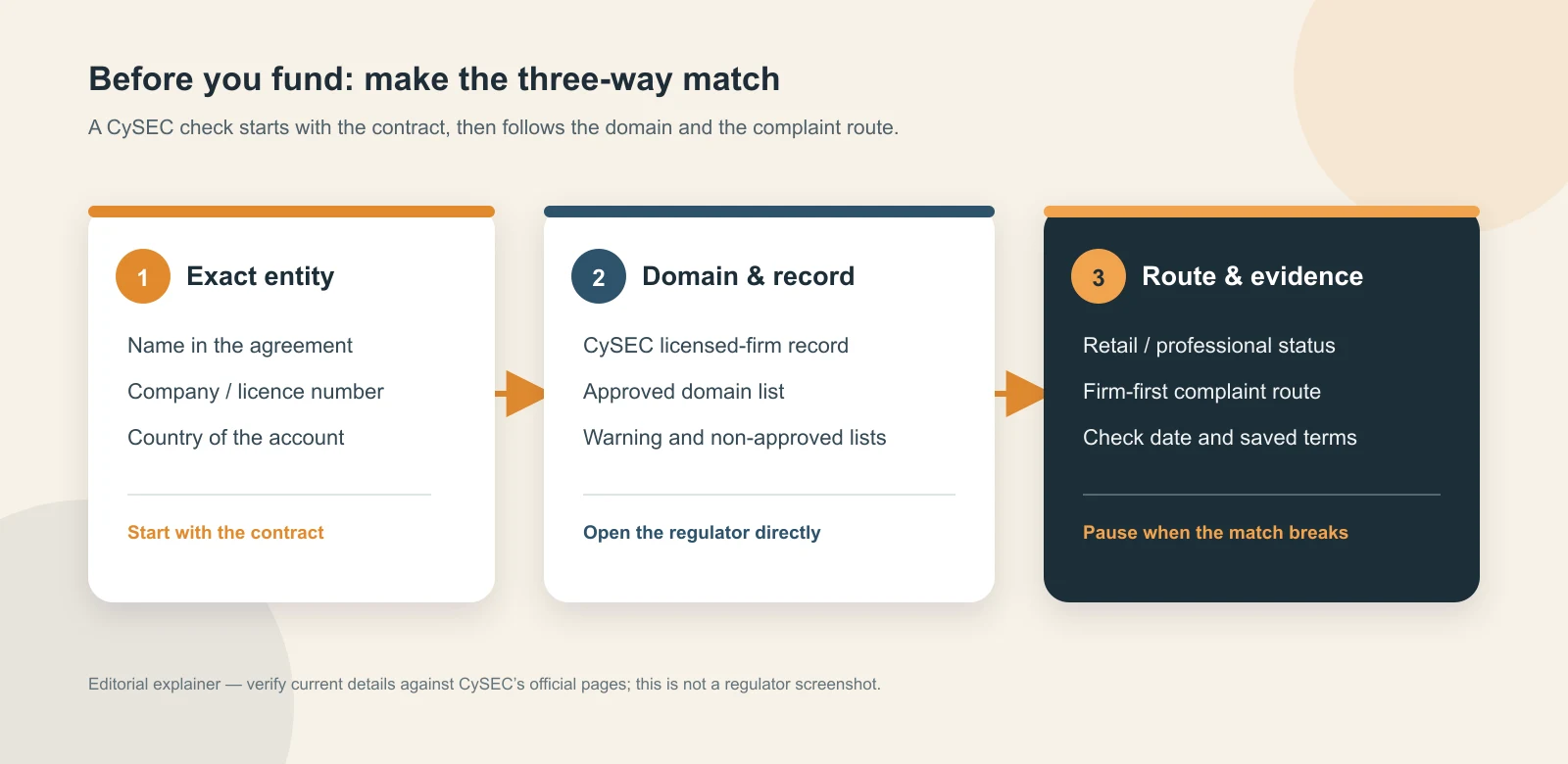
Step 1: Find the exact legal entity before you search
Start with the customer agreement, account-opening screen, website legal notice, privacy notice, deposit instructions and any disclosure shown before you fund the account. Record the full company name, company number, licence number, registered address, website domain and the country in which the account is being opened.
Do not search only for a brand or app name. The brand may be shared by several companies. If the person contacting you cannot identify the company that will receive your money and provide the contract that names it, pause the application until that point is clear. For an MT5 account, our MT5 broker verification guide explains how to connect the platform name to the company in your agreement.
Step 2: Open the official CySEC register directly
Go directly to the CySEC licensed Cypriot investment-firms register. Type the exact legal name from the account documents. If a licence number is published, run a second search using that number and confirm that both searches lead to the same firm.
Check spelling, legal suffixes, company number and address. Similar names are not a match. A search result that belongs to a former firm, another group company or a similarly named business does not verify the entity offering your account.
Step 3: Record the licence and firm details
Save the firm name, licence number, licence date, company registration number, contact details and approved trade names displayed in the CySEC record. Note the date you checked the page and keep the URL. If the record does not contain the detail you need, use the firm’s official documents and contact CySEC through its own website rather than relying on a broker-supplied explanation.
Read the account agreement as well as the register. A listed investment firm is evidence of the firm’s regulatory identity; it is not an endorsement of every product, promotion or account route. Confirm that the legal company in the agreement is the one you searched.
Step 4: Match the website and approved domain
Open CySEC’s approved domains list and compare the broker’s actual domain, including the spelling and top-level domain. Compare the address, telephone number and email domain with the details in the CySEC firm record. Use a new browser tab to reach CySEC; do not use a link sent by a salesperson or a message claiming that the regulator has approved the offer.
Also check the non-approved domains page. A mismatch does not automatically explain the situation, but it is a reason to stop and verify. A login portal, payment page or affiliate landing page that silently moves you to another domain should be checked as a separate identity.
Step 5: Check warnings and clone-firm signals
Review the CySEC warning list using the exact company name, brand, domain and contact details. CySEC’s scam guidance also recommends checking the authorised-entities and approved-domains pages directly and comparing contact information.
The absence of a name from a warning list is not a clean bill of health. Warning lists are updated over time, and a clone website can use a real firm’s name. If the domain, payment recipient, address or person contacting you does not match the official record, treat the mismatch as material evidence and pause before sending funds or identity documents.
Step 6: Confirm the country, product and client route
Ask which company and legal terms apply to your country of residence. A brand may show the same logo to readers in Europe, the United States, the United Kingdom or elsewhere while routing those readers to different companies. A CySEC listing does not prove that a US resident, Turkish resident or any other visitor is eligible for that entity’s offer.
Check whether the account is classified as retail or professional and which product is covered by the agreement. ESMA introduced temporary retail CFD measures in 2018 covering leverage limits, margin close-out, negative balance protection, incentives and risk warnings. Cyprus subsequently adopted national CFD measures. For the current Cyprus text, consult the consolidated Directive DI87-09 on CySEC’s legislation page. This framework does not establish that your account is eligible, retail, or contracted with the CySEC entity. Read the actual disclosures before accepting a classification change.
Step 7: Save the evidence before you fund
Keep a short evidence file containing the agreement, the legal name and licence number, the CySEC register URL, the approved-domain result, warning-list result, account country, client classification, and the date checked. Save copies of important terms or PDFs because a page can later change.
Repeat the check if the broker changes its domain, redirects you to another company, changes the payment recipient, asks you to become a professional client, or sends a new agreement. A prior check is not a permanent approval.
CySEC evidence table
| Check | Official evidence | What it supports | What it does not prove |
|---|---|---|---|
| Exact legal entity | CySEC licensed-firm register | The named firm appears in the regulator’s published record. | That the visitor’s account is with that firm. |
| Licence and contacts | Firm record and account documents | The legal identity, company number and published contacts can be compared. | That every product or promotion is authorised or suitable. |
| Domain | Approved domains and non-approved domains | The domain can be checked against CySEC’s published lists. | That a matching domain guarantees good service. |
| Warnings | CySEC warning list | A published warning or identity conflict is a serious stop signal. | That no warning means the firm is cleared. |
| Complaint route | CySEC complaint procedure | The sequence and limits of the available supervisory route. | That CySEC can recover an individual’s money. |
What to do if you need to complain
First complain in writing to the Cyprus Investment Firm named in your agreement. CySEC says the firm should provide a unique reference number for complaints received after 1 January 2016, acknowledge the complaint within five days, and provide a written response within two months or explain the delay, with a maximum of three months from the complaint date.
CySEC explains that it does not have restitution powers and does not investigate individual complaints in the same way as a dispute-resolution body. If the firm rejects the complaint or does not respond within three months, check whether you are eligible to contact the Financial Ombudsman. CySEC advises contacting the Ombudsman within four months of receiving the firm’s final response. Check the Ombudsman’s current eligibility rules and deadlines for your case.
The Investor Compensation Fund is a separate framework for clients of Cyprus Investment Firms. Do not treat a firm’s existence in the ICF framework as an automatic payout. Eligibility, exclusions and coverage depend on the facts, the investment service and the applicable rules.
For a practical account-level route check, use FXPEDIA360’s Complaint Route Finder and save the entity and country result alongside your documents.

When to pause the application
- The broker will not name the legal company in the agreement.
- The company name, licence number, address or phone number does not match the CySEC record.
- The website or payment page is not the approved domain, or it appears on the non-approved list.
- The person contacting you uses a real firm’s name but a different email domain or payment recipient.
- You are pressured to deposit quickly, move to a private chat, or give up retail protections without a clear explanation.
- The offer depends on a country route or professional classification that is missing from the written terms.
What this check does not prove
A CySEC match is a regulatory-identity check. It is not a recommendation, a guarantee of safety, a promise of profit, a prediction of execution or withdrawal performance, or proof that a dispute will be reimbursed. Use the evidence to decide what needs clarification before you fund an account.
CySEC forex broker checklist
- Exact contracting company identified in the agreement
- Legal name and licence number searched in the official CySEC register
- Company number, contacts and approved trade names recorded
- Website, portal and payment domain compared with CySEC’s domain lists
- CySEC warning list checked; absence of a warning not treated as clearance
- Country, product and retail/professional classification confirmed
- Terms, source URLs and check date saved
- Firm-first complaint route and Ombudsman eligibility recorded
Frequently asked questions
Is a CySEC licence enough to choose a forex broker?
No. It helps verify a legal and regulatory identity, but it does not answer whether the account route, product, country eligibility, costs or service are suitable for you.
Does a CySEC-regulated brand cover every country?
No. Check the company named in your agreement and the country-specific onboarding route. The same brand can use different legal entities.
Does a clean CySEC warning-list search prove legitimacy?
No. CySEC itself advises checking authorised entities, contact details, approved domains and warnings. A clone site may use a real firm’s name, and a warning list is not a complete approval test.
Can CySEC recover my money?
CySEC says it does not have restitution powers for individual complaints. Follow the firm’s complaint process first, then check Financial Ombudsman eligibility and any separate compensation-fund rules.
Related checks: Compare this process with our FCA Register guide, NFA BASIC guide and regulated versus offshore explanation. You can also start with the Broker Entity Lookup.
Educational note: This guide is general information, not legal, regulatory, tax or investment advice. Official records and account terms can change. Check the current source pages and obtain independent advice when the amount or dispute is material.
The photographs are AI-generated illustrative scenes, not actual broker, customer or regulator records.
Official sources checked on 13 September 2026
- CySEC licensed Cypriot investment firms
- CySEC approved domains
- CySEC non-approved domains
- CySEC warnings
- CySEC guidance on avoiding investment scams
- CySEC complaint procedure
- CySEC Financial Ombudsman information
- CySEC Investor Compensation Fund guide
- ESMA CFD product-intervention measures
- CySEC introduction of national CFD measures (2019)
- CySEC secondary legislation, including consolidated Directive DI87-09